.svg)


We kept finding the same issue: an application can look like one system while making different information available through its API, the services behind its screens, its reports, and its database. Each is a different interface. While building AI agents that needed to work with these kinds of applications, we realized that a connection to one interface can work perfectly while still leaving out what you need. So before you call an integration done, start with the question, identify the information needed to answer it, find where each part is available, and decide how you will verify that the answer is complete.
When we connect a new enterprise application to a workflow, it tends to play out the same way. We try the obvious interface first: the public API. The connection worked, but this time we had specific questions to answer, and within a few minutes it was clear that the API held only a fraction of what we needed - the information we were after simply was not there.
Okay, we thought, there is always the screen. We could see much of what we needed rendered right there in the UI, and if we had to, we could drive the browser and read it off the page. Slow and brittle, but it would do the job.
Before we went down that road, we stopped on a smaller question: how does the data get onto the screen in the first place? What is the page calling to fill itself in? If the answer is another application interface, then the public API is not the only interface - and maybe we do not have to scrape anything at all.
So we watched what the app did instead of what it showed. It used several services to populate different parts of the screen, each supplying its own slice of the system.
That changed the problem entirely. The question was no longer "How do we get the data out?" but "There are several interfaces - which one provides the data we need, and what does each interface provide?"
We did not have only an access problem. We also had a mapping problem.
That was our first clue: getting a response and getting the whole answer were not the same thing.
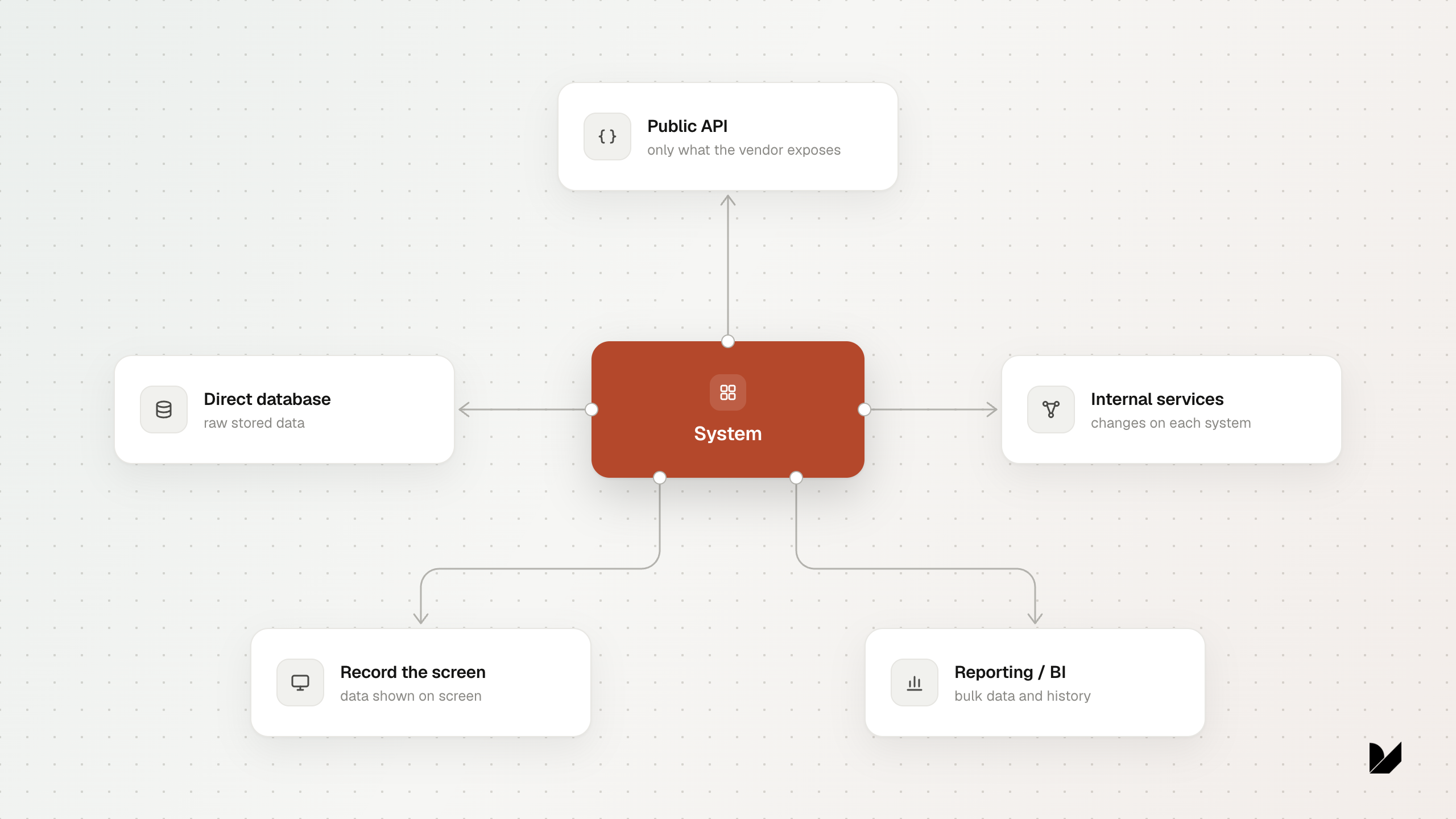
Enterprise applications often expose different parts of themselves through different interfaces.
These are not simply different routes to the same data. A public API is designed as a contract for other programs. Front-end services are built to assemble screens and can change when those screens change. A reporting layer has its own schema and often its own definitions of fields. A database may hold the stored values without the context that explains how the application uses them.
Each interface shows a different view of the same application. On day one you rarely know which one contains the field you need, you discover that map as you go.
That is why automation on top of these systems is rarely plug-and-play. Before you can build the workflow, you have to map the application.
We first ran into this on a medical records system. Clinical and administrative staff used it to schedule appointments, manage patient visits, and manage billing. We could list the appointments easily enough through the application's API. But the details that actually mattered - when each patient checked in, when they were seen, how long they waited, and whether they showed up at all - were available only through the reporting layer.
The API gave us the appointment. The reporting layer told us what happened during the visit.
That was when we had to decide what "complete" actually meant. For this question, it meant having the check-in time, the time the patient was seen, the wait duration, and the no-show status. Every record came back - the request succeeded. Nothing looked wrong, but not all the information was there.
"Succeeded" only meant that the system had not complained - not that it had given us what we needed.
And it was not just a few missing details - whole capabilities were split across interfaces. The system's settings could be read through one interface but not another. One interface could return a full list of records at once, while another exposed them only one at a time. If you simply used the first interface you found, you could quietly miss data you did not know existed.
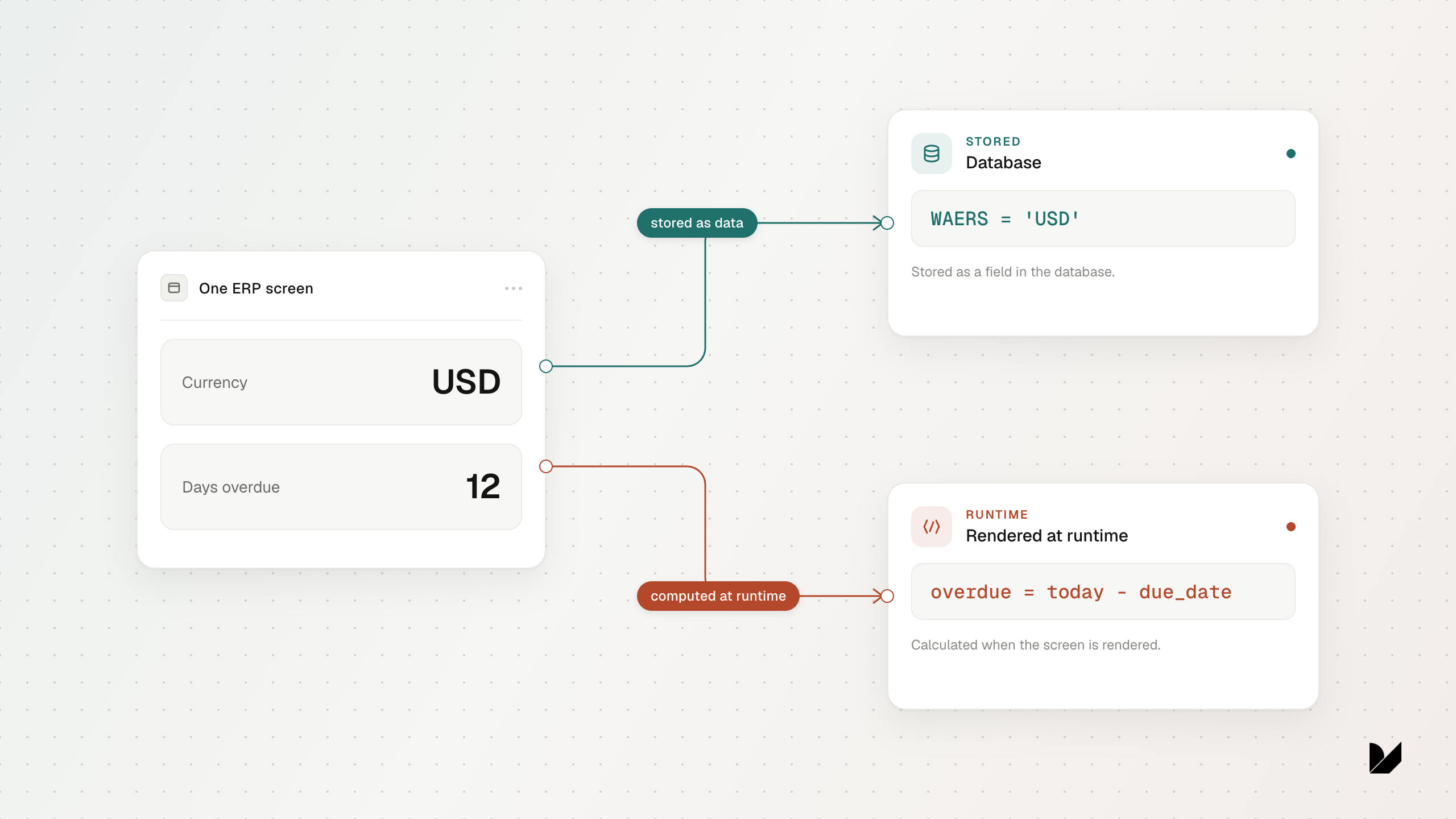
The next system was a large ERP - the kind of software that had grown over many years. This is a system that different teams uses different parts of it to manage core operational processes.
To its users, it looked like one application. Underneath, it was several generations of technology living side by side.
On some screens, every visible field mapped cleanly to stored data. On others, the application created values only when the screen opened and discarded them when the user left. To the person using the application, both kinds of fields looked exactly the same.
There was no single pattern for the application. Before we could retrieve something, we had to work out how that part of the application produced it.
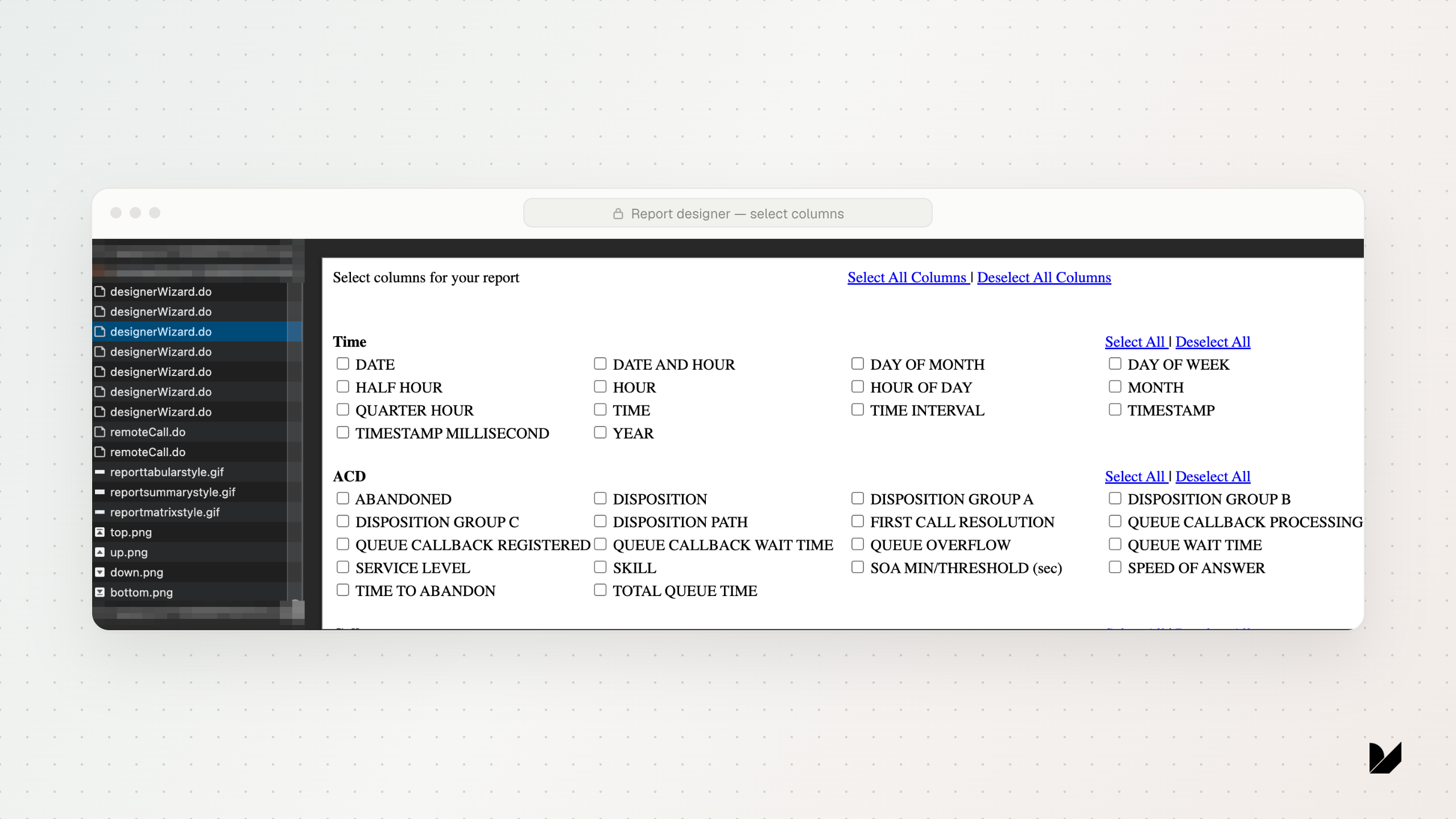
The third system was a support-center. Support reps used it throughout the day to handle calls and chats, while supervisors used its reports to monitor queues. We needed to answer questions about caller wait times and call outcomes for efficiency initiatives. The platform had a Report Designer, so a supervisor could export data manually. But that worked only if the person already knew which source and fields to choose. The Report Designer showed one source at a time. We needed to understand the application as a whole.
We selected one data source and advanced to the Columns step. At that moment, the application loaded a schema containing 70 fields. We captured the response, went back, and did the same for the other sources. Each described a different kind of record, but the Report Designer never showed them together. So we combined the schemas into one catalog and mapped each question to the right source: caller wait time to ACD queue, agent availability to Agent, and individual call outcomes to Call Log.
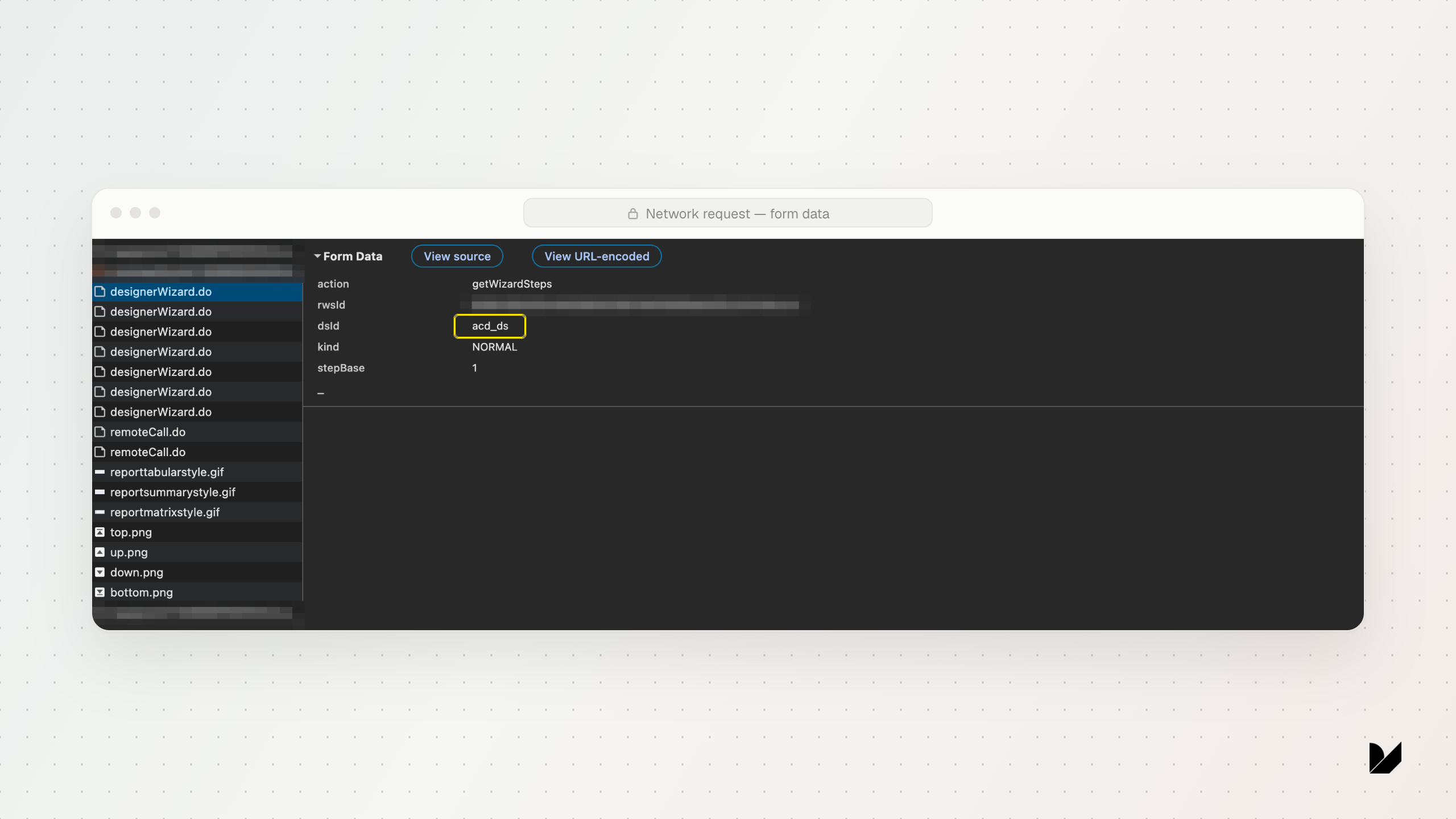
Once the catalog existed, the next question no longer meant starting from the report builder and guessing. Our program could select the right source, populate the report with the required fields, run it, and retrieve the result. The information had been in the product all along. What was missing was a reliable way to find it, connect it to a question, and retrieve it again.
By the third system, the pattern was hard to miss. In every case, the information existed, but no single interface provided the whole answer. The path to the right fields, and the meaning of what came back, were specific to the application.
An LLM does not arrive with that context. It can reason over what it can see, but it cannot reliably guess which interface contains a field, what a successful response leaves out, or how the different parts of an application fit together.
What works for one system cannot simply be assumed to work for the next.
That context does not stay fixed, either. Applications change. Screens are redesigned, reports evolve, and services or fields are replaced. A workflow can become incomplete without producing an obvious error.
Before calling an integration successful, ask yourself:
P.S. - Say you skip all of this and get raw database access: every table, every row. Would you know what any of it means? Spoiler: not yet.
That is for next time.